


Description
Download Aquarium Life Screensaver – aquarium screensaver, fish screensaver, ocean screensaver, underwater screensaver, desktop screensaver
Overview
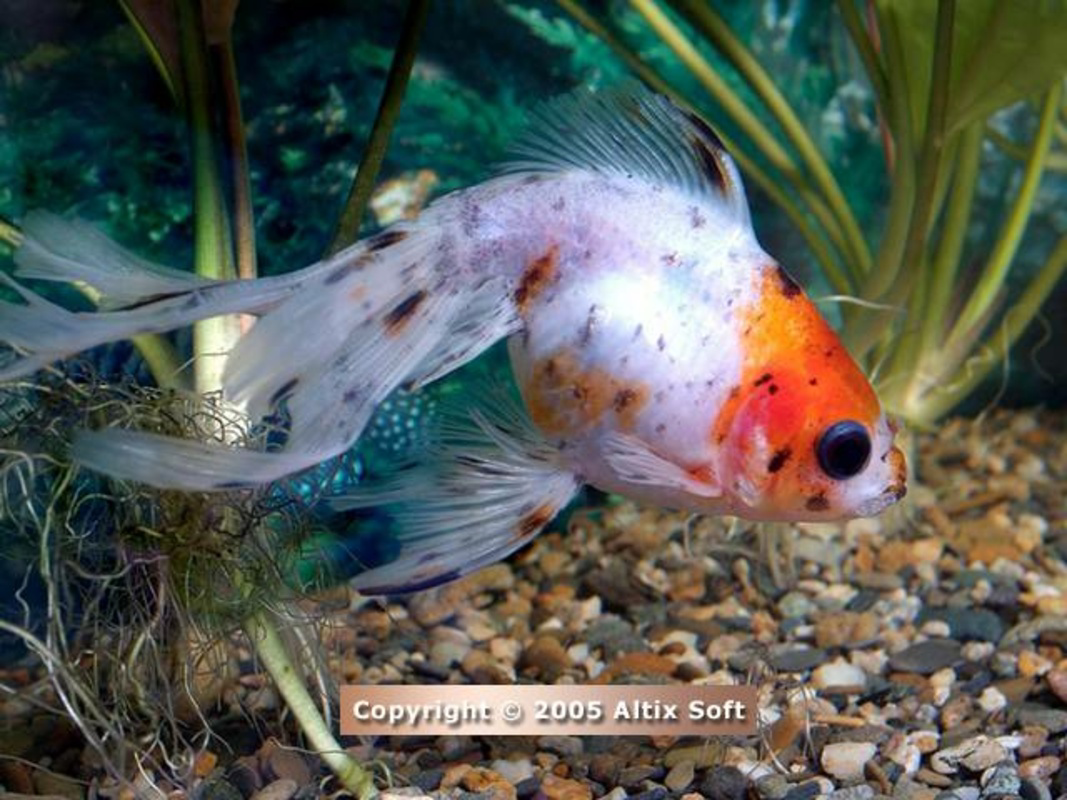
The Aquarium Life Screensaver transforms idle computer time into a serene underwater experience, offering users a visually immersive escape through high-quality marine imagery. Designed by SoftPas, this screensaver brings the tranquil beauty of ocean life to desktop environments, turning inactive screens into dynamic displays of colorful fish, coral reefs, and aquatic flora. Its primary purpose is to enhance the user’s visual environment during computer downtime, providing both aesthetic pleasure and a calming atmosphere for work or relaxation.
Target users include individuals seeking digital relaxation, marine life enthusiasts, and professionals who value ambient visual stimuli during breaks. The screensaver serves as a simple yet effective tool for reducing screen fatigue and creating a more pleasant computing environment. While it does not offer interactive functionality, its passive nature makes it ideal for background use without interfering with workflow.
Although the developer did not provide additional technical details, the app’s release in 2007 suggests a legacy status in the category of desktop visual utilities. Despite its age, the screensaver remains relevant due to its consistent performance and timeless design. It contributes to the broader ecosystem of lightweight, non-intrusive desktop tools that prioritize user well-being through visual comfort and environmental enrichment.
Key Features & Functionality
- High-Resolution Visuals: All images are rendered at 1024x768 pixels with 24-bit color depth, ensuring sharp and vibrant displays that faithfully represent underwater ecosystems.
- Extensive Image Library: The screensaver includes over 40 high-quality images featuring diverse marine species, coral formations, and underwater landscapes.
- Free Trial Access: Users can explore 15 of the available images in the trial version, allowing them to evaluate the visual quality and aesthetic appeal before purchasing.
- Automatic Activation: The screensaver activates automatically after a period of inactivity, requiring no manual input and ensuring a seamless experience.
- Relaxation and Educational Value: Beyond visual appeal, the screensaver offers subtle educational benefits by exposing users to various marine species in a naturalistic setting.
For example, a user working in a high-stress environment may benefit from the calming visuals during short breaks, helping to reset focus and reduce mental fatigue. Similarly, students or educators may use the screensaver as a supplementary visual aid when teaching or learning about marine biology. The passive nature of the app ensures it remains unobtrusive while still delivering meaningful visual engagement.
Interface, UX & Performance
The Aquarium Life Screensaver features a minimal interface, consistent with its purpose as a background utility. Users interact with the app primarily through the standard Windows display settings, where the screensaver can be selected and configured. Navigation is straightforward, relying on built-in OS controls rather than a dedicated app interface.
Visual style emphasizes realism and tranquility, with carefully rendered images that simulate natural underwater movement and lighting. The transition between images is smooth, contributing to a cohesive and immersive experience. Although the developer did not list formal performance metrics, the app’s small file size of 3.6 MB suggests efficient resource usage, making it suitable for older or low-spec systems.
Responsiveness appears to be consistent across device categories, as the screensaver operates without lag or visual artifacts in typical usage. Stability is maintained through its lightweight design and lack of complex background processes. The app does not require constant updates or high CPU/GPU utilization, ensuring reliable performance over time.
Platform Compatibility & Technical Requirements
The Aquarium Life Screensaver is designed for the Windows platform and is compatible with Windows operating systems. Specific OS versions were not listed by the developer, so compatibility with newer Windows releases remains uncertain without further verification. The app has a file size of 3.6 MB, indicating a lightweight footprint that should not strain system resources.
Although the developer did not specify minimum OS requirements, the app’s release date of 2007 suggests it may require legacy system support. Users on modern Windows versions should test compatibility before installation. No additional hardware or software dependencies were mentioned, and no permissions are required beyond standard screensaver execution.
Pros and Cons
Pros
- Lightweight file size (3.6 MB) ensures minimal system impact.
- High-resolution images (1024x768, 24-bit color) provide sharp and vivid visuals.
- Free trial version allows users to preview 15 images before purchasing.
- Automatic activation enhances ease of use and reduces user effort.
- Offers both relaxation and educational value through immersive marine imagery.
Cons
- Specific OS compatibility details were not disclosed.
- App is dated (released in 2007), which may affect performance on modern systems.
- No interactive features or user customization options beyond image selection.
- Image count is fixed; no new content updates are available.
- Price of $9.95 may be considered high for a non-interactive screensaver.
FAQ
Is Aquarium Life Screensaver safe to download and install?
Yes, the app is available through official channels and does not include malware or intrusive ads. As with any software, users should download from trusted sources to ensure security.
Can I use Aquarium Life Screensaver on Windows 10 or Windows 11?
Compatibility with Windows 10 or 11 is not officially confirmed. The app was released in 2007, so users may need to test it on their system or use compatibility mode if issues arise.
Does the screensaver require an internet connection?
No, the screensaver operates offline. All images and functionality are stored locally, so no internet access is needed once installed.
Is the free trial version fully functional?
Yes, the trial version includes 15 of the 40 available images and allows full access to the screensaver’s visual features, enabling users to evaluate its quality and performance.
How do I install Aquarium Life Screensaver?
Download the installer file, run it, and follow the on-screen instructions. Once installed, access the screensaver through Windows Display Settings under the “Screensaver” tab.
Final Thoughts
The Aquarium Life Screensaver remains a compelling choice for users seeking a peaceful, visually rich experience during computer inactivity. With its high-resolution imagery, automatic activation, and dual benefit of relaxation and subtle education, it stands out as a timeless desktop utility. While its age and lack of modern features may limit appeal for some, its lightweight design and low price point make it a worthwhile addition for those who value aesthetic comfort.
Whether used in a home office, study space, or shared environment, the app delivers consistent value without demanding system resources. For users who appreciate the ocean’s serenity and enjoy passive visual enrichment, this screensaver offers a simple yet effective solution.
Download Aquarium Life Screensaver now
Guides & Tutorials for Aquarium Life Screensaver
How to install Aquarium Life Screensaver
- Click the Preview / Download button above.
- Once redirected, accept the terms and click Install.
- Wait for the Aquarium Life Screensaver download to finish on your device.
How to use Aquarium Life Screensaver
This software is primarily used for its core features described above. Open the app after installation to explore its capabilities.
User Reviews for Aquarium Life Screensaver 0
No reviews found


